Jed Rembold & Fred Agbo
January 22, 2025
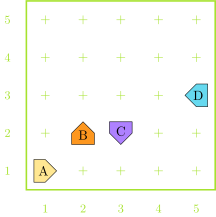
Karel starts in the empty world shown at one of the marked positions and runs the below code. One of the starting positions will result in an error before the code finishes. Which one?
for i in range(3):
move()
turn_left()
for i in range(2):
if front_is_blocked():
turn_around()
move()
turn_right()
int for integers and whole
numbers
1, 2, 3, 10, 1001010101, -231float for numbers containing a
decimal point
1.23, 3.14, 10.001, 0.0, -8.23complex for numbers with an imaginary
component (which we won’t deal with)
i + j the sum of
i and ji - j the difference between
i and ji * j the product of
i and ji // j the floor division of
i by ji / j the division of
i by j†i % j the remainder when
i is divided by
ji ** j i
to the power of j-j the negation of
j – Returns
int if both i
and j are integers,
float otherwise
† – Returns
float always
** (exponents, executed right to
left)-n (negative numbers)*, /,
//, %, executed
from left to right+ and -,
executed from left to rightWhat is the value of the below expression?
1 * 2 * 3 + (4 + 5) % 6 + (7 * 8) // 9
You create a variable by assigning it a value with Python’s
assignment statement =:
variable_name = expressionThe variable name must appear on the left of the
=
Python first computes the value of the righthand side of the equals and then assigns to the name on the left
The same variable name can seem to appear on both sides of the equals!
total = total + value
total on the right represents some
existing valuetotal on the left is the new label
of whatever the right summed toWhen you assign a new value to a variable, the old value is lost
>>> A = 10
>>> print(A)
10
>>> B = A + 5
>>> print(B)
15
>>> A = B
>>> print(A)
15Variables defined in terms of others do not get automatically updated
>>> A = 10
>>> B = A + 2
>>> A = 8
>>> print(B)
12this_is_amazingthisIsAmazingMAX_WIDTHradius and
Radius are different variable names!It is very common to want to adjust an existing variable
balance = balance + depositPython gives you a shorter expression to describe this relationship:
balance += depositYou can do this with any operation (op) following the general form:
variable op= expressionYou can name multiple variables at once by separating with commas
A, B, C = 1, 2, 3
The general form of a function definition looks like:
def name(parameter_list):
#statements in function body
name is your chosen name for the
functionparameter_list is a
comma-separated list of variable names that will hold
each input valueYou can return or output a value from the function by including a return statement
return expression
expression is the value you want to
return or outputreturn statement is included,
Python will by default return None
Convert Fahrenheit temperatures to their Celsius equivalent
def f_to_c(f):
return 5 / 9 * (f - 32)
Using the function:
print(f_to_c(45))Computes the volume of a cylinder of height
h and radius
r
def cylinder_volume(r, h):
return 3.14159 * r**2 * h
Using the function:
print(cylinder_volume(2,10))| Function | Description |
|---|---|
abs(x) |
The absolute value of x |
max(x,y,...) |
The largest of all the arguments |
min(x,y,...) |
The smallest of all the arguments |
round(x) |
The value of x rounded to the nearest integer |
int(x) |
The value of x truncated to an integer |
float(x) |
The value of x as a decimal |
.py
printprint() command will display whatever is
between the () to the screenSeparate each thing by a comma inside the
print statement. This will insert a space
between each when printed.
print(1,2,'blue')Concatenate what you want together with
+, converting to strings as needed
python print('2000' + ' - ' + '2023')
print(str(1) + ' ' + str(2) + ' blue')