Queues Implementation
Fred Agbo
2025-10-27
Announcements
- Welcome!
- Mini project 2 is due today Monday October 27
Requirements for LinkedQueue
- Step 1: Implement an
AbstractQueueclass- Include all common queue methods:
is_empty()__len__()__str__()__iter__()- etc
- Follow the design pattern demonstrated in
AbstractStack
- Include all common queue methods:
Requirements for LinkedQueue
- Step 2: Import the
Nodeclass from your previousnode.pyfile- This class will be used to build the linked structure of the queue
Requirements for LinkedQueue
- Step 3: Implement the
LinkedQueueclass- Inherit from
AbstractQueue - Use
Nodeobjects to manage the queue’s elements
- Inherit from
Requirements for LinkedQueue
- Step 3: Implement the
LinkedQueueclass
from node import Node
from abstractqueue import AbstractQueue

class LinkedQueue(AbstractQueue):
    """ Link-based queue implementation."""
    def __init__(self, sourceCollection = None):
        self.front = self.rear = None
        AbstractQueue.__init__(self, sourceCollection)

    # Accessors
    def __iter__(self):
        """Supports iteration over a view of self."""
        cursor = self.front
        while not cursor is None:
            yield cursor.data
            cursor = cursor.next

    def peek(self):
        """Returns the item at top of the queue.
        Precondition: the queue is not empty."""
        if self.isEmpty():
            raise KeyError("The queue is empty.")
        return self.front.data

    # Mutators
    def clear(self):
        """Makes self become empty."""
        self.size = 0
        self.front = self.rear = None

    def add(self, item):
        """Inserts item at top of the queue."""
        newNode = Node(item, None)
        if self.isEmpty():
            self.front = newNode
        else:
            self.rear.next = newNode
        self.rear = newNode
        self.size += 1

    def pop(self):
        """Removes and returns the item at top of the queue.
        Precondition: the queue is not empty."""
        if self.isEmpty():
            raise KeyError("The queue is empty.")
        oldItem = self.front.data
        self.front = self.front.next
        if self.front == None:
            self.rear = None
        self.size -= 1
        return oldItem
Requirements for LinkedQueue
- Step 4: Create a
testqueue.pyfile- Include a
tester()method to verify all queue operations - Test cases should cover:
- Adding and removing items
- Peeking at the front item
- Checking if the queue is empty
- Iterating through the queue
- Clearing the queue
- Include a
Requirements for LinkedQueue
- Step 4: Create a
testqueue.pyfile
"""
File: testqueue.py
A tester program for queue implementations.
"""

#from arrayqueue import ArrayQueue
from linkedqueue import LinkedQueue

def test(queueType):
    # Test any implementation with same code
    q = queueType()
    print("Length:", len(q))
    print("Empty:", q.isEmpty())
    print("Add 1-10")
    for i in range(10):
        q.add(i + 1)
    try:
        print("Peeking:", q.peek())
        print("Items (front to rear):",  q)
        print("Length:", len(q))
        print("Empty:", q.isEmpty())
    except KeyError as e:
        print("Peeking: Exception -", e)
    theClone = queueType(q)
    print("Items in clone (front to rear):",  theClone)
    theClone.clear()
    print("Length of clone after clear:",  len(theClone))
    print("Pop 3 items:", end = " ")
    for count in range(3): print(q.pop(), end = " ")
    print("\nQueue: ", q)
    print("Adding 11 and 12:")
    for item in range(11, 13): q.add(item)
    print("Queue: ", q)
    print("Popping items (front to rear): ", end="")
    while not q.isEmpty(): print(q.pop(), end=" ")
    print("\nLength:", len(q))
    print("Empty:", q.isEmpty())
    print("Create with 11 items:")
    q = queueType(range(1, 12))
    print("Items (front to rear):",  q)
    q = queueType(range(1, 11))
    print("Items (front to rear):",  q)
    print("Popping two items: ", q.pop(), q.pop(), q)
    print("Adding five items: ", end = "")
    for count in range(5):
        q.add(count)
    print(q)

#test(ArrayQueue)
test(LinkedQueue)
Priority Queues
- In priority queues:
- Items added to the queue are assigned an order of rank
- Items of higher priority are removed before those of lower priority
- Items of equal priority are removed in FIFO order
States in a Priority Queue
| Operation | State of Queue after Operation | Value Returned | Comment |
|---|---|---|---|
| q = |
Initially, the queue is empty | ||
| q.add(3) | 3 | The queue contains the single item 3 | |
| q.add(1) | 1 3 | 1 is at the front of queue and 3 is at the rear of queue because 1 has higher priority | |
| q.add(2) | 1 2 3 | 2 is added but has a higher priority than 3, so 2 moves ahead of 3 | |
| q.pop() | 2 3 | 1 | Remove the front item from the queue and return it; 2 is now the front item |
| q.add(3) | 2 3 3 | The new 3 is inserted after the existing 3, in FIFO order | |
| q.add(5) | 2 3 3 5 | 5 has the lowest priority, so it goes to rear |
Priority Queues
- Integers, strings, or any other objects that recognize comparison operators can be ordered in priority queues
- If an object does not recognize these operators,
- It can be wrapped, or bundled, with a priority number in another object that does recognize these operators
- The queue will then recognize this object as comparable with others of its type
- A wrapper class used to build a comparable item from one that is not already comparable is named
Comparable:- It includes a constructor that expects an item and the item’s priority as arguments
- The priority must be an integer, a string, or another object that recognizes the comparison operators
Priority Queues: Comparable class
class Comparable(object):
    """Wrapper class for items that are not comparable."""
    def __init__(self, data, priority = 1):
        self.data = data
        self.priority = priority

    def __str__(self):
        """Returns the string rep of the contained datum."""
        return str(self.data)

    def __eq__(self, other):
        """Returns True if the contained priorities are equal
        or False otherwise."""
        if self is other: return True
        if type(self) != type(other): return False
        return self.priority == other.priority

    def __lt__(self, other):
        """Returns True if self's priority < other's priority,
        or False otherwise."""
        return self.priority < other.priority

    def __le__(self, other):
        """Returns True if self's priority <= other's priority,
        or False otherwise."""
        return self.priority <= other.priority

    def getData(self):
        """Returns the contained datum."""
        return self.data

    def getPriority(self):
        """Returns the contained priority."""
        return self.priority
Priority Queues
- During insertions, a priority queue does not know whether it is comparing items in wrappers or just items
- When a wrapped item is accessed with the method
peekorpopor in the context of aforloop,- It must be unwrapped with the method
getItembefore processing
- It must be unwrapped with the method
- For example, assume that the items labeled
a,b, andcare not comparable but should have the priorities 1, 2, and 3, respectively, in a queue:- The code to add them to a priority queue named queue and retrieve them from it
Priority Queues: Sorted list
- A priority queue’s list should be arranged so that the minimum element is always accessed at or removed from just one end of the list:
- The elements are inserted in their proper places in the ordering
- A singly linked structure represents this type of list well if the minimum element is always removed from the head of the structure
- If this structure is inherited from the singly linked structure used in the
LinkedQueueclass, you can continue to remove an element by running that class’spopmethod:- Only the
addmethod needs to change; its definition is overridden in the new subclass, calledLinkedPriorityQueue
- Only the
Priority Queues: Sorted list
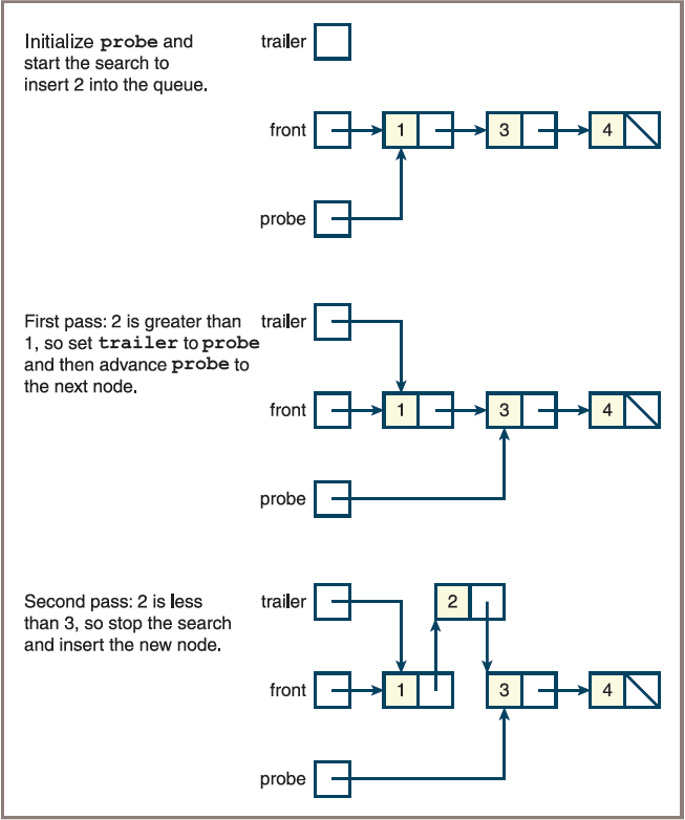
- The new implementation of add conducts a search for the new item’s position in the list
- It considers the following cases:
- If the queue is empty or the new item is greater than or equal to the item at the rear, add it as before (It will be placed at the rear)
- Otherwise, begin at the head and move forward through the nodes until the new item is less than the item in the current node (At that point, a new node containing the item must be inserted between the current node and the previous node, if there is one)
Priority Queues: Sorted list
- The state of a priority queue containing the three integers 1, 3, and 4 during the add of the value 2
Class LinkedPriorityQueue
"""
File: linkedpriorityqueue.py
"""
from node import Node
from linkedqueue import LinkedQueue

class LinkedPriorityQueue(LinkedQueue):
    """ A link-based priority queue implementation. """

    def __init__(self, sourceCollection = None):
        """Sets the initial state of self, which includes the
        contents of sourceCollection, if it’s present."""
        LinkedQueue.__init__(self, sourceCollection)

    def add(self, newItem):
        """Inserts newItem after items of greater or equal
        priority or ahead of items of lesser priority.
        A has greater priority than B if A < B."""
        if self.isEmpty() or newItem >= self.rear.data:
            # New item goes at rear
            LinkedQueue.add(self, newItem)
        else:
            # Search for a position where it’s less
            probe = self.front
            while newItem >= probe.data:
                trailer = probe
                probe = probe.next
            newNode = Node(newItem, probe)
            if probe == self.front:
                # New item goes at front
                self.front = newNode
            else:
                # New item goes between two nodes
                trailer.next = newNode
            self.size += 1
TestPriorityQueue
"""
File: testpriorityqueue.py
A tester program for priority queue implementations.
"""

from linkedpriorityqueue import LinkedPriorityQueue
from comparable import Comparable
import random

def test(queueType):
    # Test any implementation with same code
    print("VERIFY THAT IT BEHAVES LIKE A REGULAR QUEUE.")
    q = queueType()
    print("Length:", len(q))
    print("Empty:", q.isEmpty())
    print("Add 1-10")
    for i in range(10):
        q.add(i + 1)
    print("Peeking:", q.peek())
    print("Items (front to rear):",  q)
    print("Length:", len(q))
    print("Empty:", q.isEmpty())
    theClone = queueType(q)
    print("Items in clone (front to rear):",  theClone)
    theClone.clear()
    print("Length of clone after clear:",  len(theClone))
    print("Pop 3 items:", end = " ")
    for count in range(3): print(q.pop(), end = " ")
    print("\nQueue: ", q)
    print("Adding 11 and 12:")
    for item in range(11, 13): q.add(item)
    print("Queue: ", q)
    print("Popping items (front to rear): ", end="")
    while not q.isEmpty(): print(q.pop(), end=" ")
    print("\nLength:", len(q))
    print("Empty:", q.isEmpty())
    print("Create with 11 items:")
    q = queueType(range(1, 12))
    print("Items (front to rear):",  q)

    print("\nVERIFY THAT IT BEHAVES LIKE A PRIORITY QUEUE.")
    lyst = list(range(1, 20, 2))
    random.shuffle(lyst)
    print("The items added: ", lyst)
    q = LinkedPriorityQueue(lyst)
    print("The queue: ", q)
    q.add(16)
    q.add(17)
    print("Adding 16 and 17: ", q)
    print("Add some random strings with random priorities attached:")
    q.clear()
    for s in "VERIFY THAT":
        c = Comparable(s, random.randint(1, 3))
        print((c.getData(), c.getPriority()))
        q.add(c)
    print("The queue: ", q)

test(LinkedPriorityQueue)
Priority Queues Case Study:
Emmergency Room Scheduler System
Class Activity in pairs
Background: ER Scheduler
The Problem and Need
- Hospital emergency rooms often have long wait times.
- Patients appear to wait together, but are actually prioritized.
- Patients are grouped and scheduled based on the seriousness of their condition.
- More critical cases are treated before less serious ones.
The Solution
- A priority queue can be used to manage patient scheduling.
- This ensures patients with higher priority (more serious conditions) are served first.
Request/Goal
- Simulate an emergency room where patients are scheduled for treatment based on priority.
- Patients are assigned a priority when admitted (higher priority = more critical).
- Supervisor/user can add patients and schedule treatments.
- Patients with higher priority are treated before those with lower priority.
ER Scheduler: User Options
- Patients arrive in one of three conditions, ranked by priority:
- Critical (highest priority)
- Serious
- Fair (lowest priority)
- The ER Scheduler provides these options:
- Schedule a Patient:
- Enter the patient’s name and condition.
- Patient is placed in the queue based on severity.
- Treat Next Patient:
- Removes and displays the patient with the most serious condition (highest priority) currently in the queue.
- Treat All Patients:
- Removes and displays all patients in order, from highest to lowest priority, until the queue is empty.
- Schedule a Patient:
Interaction on Terminal Interface
| User Command | Program Response |
|---|---|
| Schedule | Prompts the user for the patient’s name and condition, and then prints |
<patient name> is added to the <condition> list. |
|
| Treat Next Patient | Prints <patient name> is being treated. |
| Treat All Patients | Prints <patient name> is being treated. |
Interaction on Terminal Interface
Main menu
1 Schedule a patient
2 Treat the next patient
3 Treat all patients
4 Exit the program
Enter a number [1-4]: 1
Enter the patient’s name: Bill
Patient’s condition:
1 Critical
2 Serious
3 Fair
Enter a number [1-3]: 1
Bill is added to the critical list.
Main menu
1 Schedule a patient
2 Treat the next patient
3 Treat all patients
4 Exit the program
Enter a number [1-4]: 3
Bill / critical is being treated.
Martin / serious is being treated.
Ken / fair is being treated.
No patients available to treat.
ER Scheduler: Application Structure
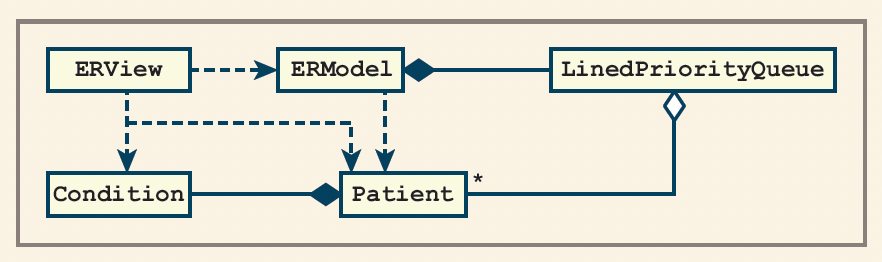
- The application is organized using the Model-View pattern:
- ERView: Handles all user interaction (input/output).
- ERModel: Maintains the priority queue of patients and provides methods to add and treat patients.
- Patient: Represents a patient, including their name and condition.
- Condition: Represents the three possible patient conditions (Critical, Serious, Fair).
ER Scheduler: Class Responsibilities
- ERView
- Presents the menu and prompts to the user.
- Calls methods on the ERModel based on user input.
- ERModel
- Stores and manages the priority queue of Patient objects.
- Provides methods to schedule and treat patients.
- Patient
- Stores patient information (name and condition).
- Can be compared based on condition priority for queue ordering.
- Condition
- Defines the three possible conditions:
- Critical (highest priority)
- Serious
- Fair (lowest priority)
- Defines the three possible conditions:
ER Scheduler: Class Diagram
ER Implementation: Model
Create a module named
ermodel.pyto implement all classes in the modelDo not forget to import your
LinkedPriorityQueueclass intoModelImplement model to contain
Condition,Patient,ERModelclasses
ER Implementation: Model
- Class
Condition
class Condition(object):
    """Represents a condition."""
    def __init__(self, rank):
        self.rank = rank

    def __eq__(self, other):
        return self.rank == other.rank

    def __lt__(self, other):
        return self.rank < other.rank

    def __le__(self, other):
        return self.rank <= other.rank

    def __str__(self):
        """Returns the string rep of a condition."""
        if   self.rank == 1: return "critical"
        elif self.rank == 2: return "serious"
        else:                 return "fair"
ER Implementation: Model
- Class
Patient
class Patient(object):
    """Represents a patient with a name and a condition."""
    def __init__(self, name, condition):
        self.name = name
        self.condition = condition

    def __eq__(self, other):
        return self.condition == other.condition

    def __lt__(self, other):
        return self.condition < other.condition

    def __le__(self, other):
        return self.condition <= other.condition

    def __str__(self):
        """Returns the string rep of a patient."""
        return self.name + " / " + str(self.condition)
ER Implementation: Model
- Class
ERModel
ER Scheduler: Implementation of ERView
"""
File: erapp.py

A terminal-based view for an emergency room scheduler.
"""

from ermodel import ERModel, Patient, Condition

class ERView(object):
    """The view class for the ER application."""

    def __init__(self, model):
        self.model = model

    def run(self):
        """Menu-driven command loop for the app."""
        menu = "Main menu\n" + \
               "  1  Schedule a patient\n" + \
               "  2  Treat the next patient\n" + \
               "  3  Treat all patients\n" \
               "  4  Exit the program\n"
        while True:
            command = self.getCommand(4, menu)
            if   command == 1: self.schedule()
            elif command == 2: self.treatNext()
            elif command == 3: self.treatAll()
            else: break

    def treatNext(self):
        """Treats one patient if there is one."""
        if self.model.isEmpty():
            print("No patients available to treat")
        else:
            patient = self.model.treatNext()
            print(patient, "is being treated.")

    def treatAll(self):
        """Treats all the remaining patients."""
        if self.model.isEmpty():
            print("No patients available to treat.")
        else:
            while not self.model.isEmpty():
                self.treatNext()

    def schedule(self):
        """Obtains patient info and schedules patient."""
        name = input("\nEnter the patient's name: ")
        condition = self.getCondition()
        self.model.schedule(Patient(name, condition))
        print(name, "is added to the", condition, "list\n")

    def getCondition(self):
        """Obtains condition info."""
        menu = "Patient's condition:\n" + \
               "  1  Critical\n" + \
               "  2  Serious\n" + \
               "  3  Fair\n"
        number = self.getCommand(3, menu)
        return Condition(number)

    def getCommand(self, high, menu):
        """Obtains and returns a command number."""
        prompt = "Enter a number [1-" + str(high) + "]: "
        commandRange = list(map(str, range(1, high + 1)))
        error = "Error, number must be 1 to " + str(high)
        while True:
            print(menu)
            command = input(prompt)
            if command in commandRange:
                return int(command)
            else:
                print(error)

# Main function to start up the application

def main():
    model = ERModel()
    view = ERView(model)
    view.run()

if __name__ == "__main__":
    main()