LINKED STRUCTURES

Fred Agbo

2025-09-22

Announcements

  • Welcome back!
  • Assignment for week 5 (Problem set 2) is posted and due on Wednesday at 10pm
  • This week is focused more on Linked Structure/Linked List
    • However, we’ll visit 2D arrays in updated in week 4 on Canvas

Linked Structures

Learning Objectives

  • Create linked structures using singly linked nodes
  • Perform various operations on linked structures with singly linked nodes
  • Describe how costs and benefits of operations on linked structures depend on how they are represented in computer memory
  • Compare the trade-offs in running time and memory usage of linked structures

Linked Structures

  • A linked structure is another way to organize data in your program
  • Just like array, it is a commonly used data structure to implement many types of collections
  • This section covers characteristics that programmers must keep in mind when using linked. structures to implement any type of collection.

Linked Structures

  • Each element in a linked structure is called a node.
  • Every node contains:
    • The data (or value) it stores.
    • A reference (or pointer/link) to the next node in the sequence.
  • The first node is called the head of the list.
  • The last node points to None (or null), indicating the end of the structure.

Linked Structures

  • Linked structures do not require contiguous memory; nodes can be scattered throughout memory.
  • Linked structures allow for efficient insertion and removal of elements at arbitrary positions, without shifting other elements.
  • Insertion and deletion operations are efficient, especially at the beginning of the structure.
  • Accessing an element by position requires traversing the structure from the head node.

Types of Linked Structure

  • Common types of linked structures include:
    • Singly linked lists
    • Doubly linked lists
    • Circular linked lists
  • The most basic linked structure is the singly linked list, where each node points to the next node.
  • Linked structures are fundamental for implementing other data structures such as stacks, queues, and more complex structures like trees and graphs.

Singly Linked Structure

  • It is useful to draw diagrams of linked structures using a box and pointer notation
  • A user of a singly linked structure accesses the first item by following a single external head link:
    • User then accesses other items by chaining through the single links that emanate from the items
    • Easy to get the successor of an item
    • Not so easy to get to the predecessor of an item

Doubly Linked Structure

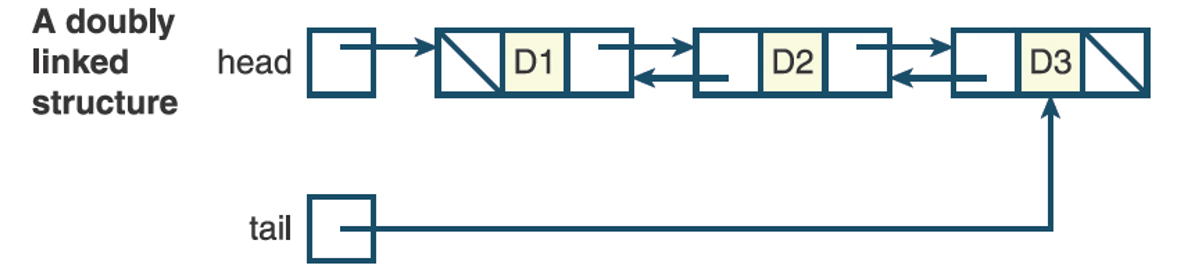
  • A doubly linked structure contains links running in both directions:
    • A second external link, called the tail link, allows the user of a doubly linked structure to access the last item directly
  • The last item in either type of linked structure has no link to the next item:
    • Figure indicates the absence of a link, called an empty link, by means of a slash instead of an arrow

Doubly Linked Structure

  • A programmer who uses a linked structure cannot immediately access an item by specifying its index position:
    • Programmer must start at one end of the structure and follow the links until the desired position (item) is reached
  • The way in which memory is allocated for linked structures is unlike that of arrays and has two important consequences for insertion and removal operations:
    • Once an insertion or removal point has been found, the insertion or removal can take place with no shifting of data items in memory
    • The linked structure can be resized during each insertion or removal with no extra memory cost and no copying of data items

Noncontiguous Memory and Nodes

  • A linked structure decouples the logical sequence of items in the structure from any ordering in memory:
    • Noncontiguous memory: The cell for a given item in a linked structure can be found anywhere in memory.
  • Basic unit of representation in a linked structure is a node
    • A singly linked node contains the following components or fields:
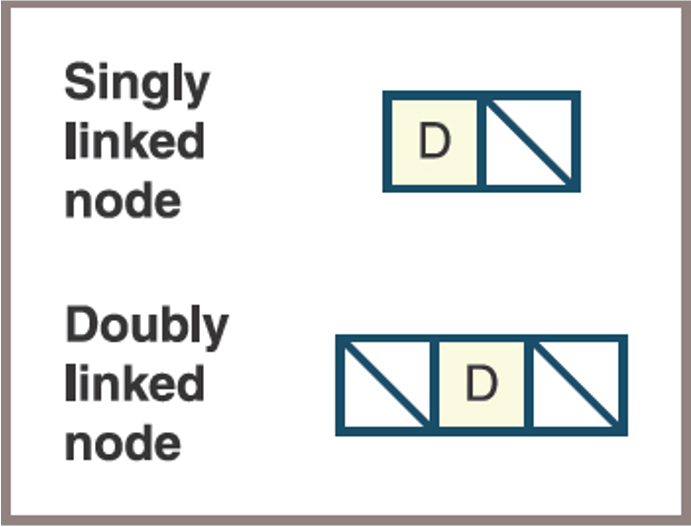
      • A data item
      • A link to the next node in the structure (a doubly linked node contains a link to the previous node in the structure as well)

Linked Structure and Array Rep

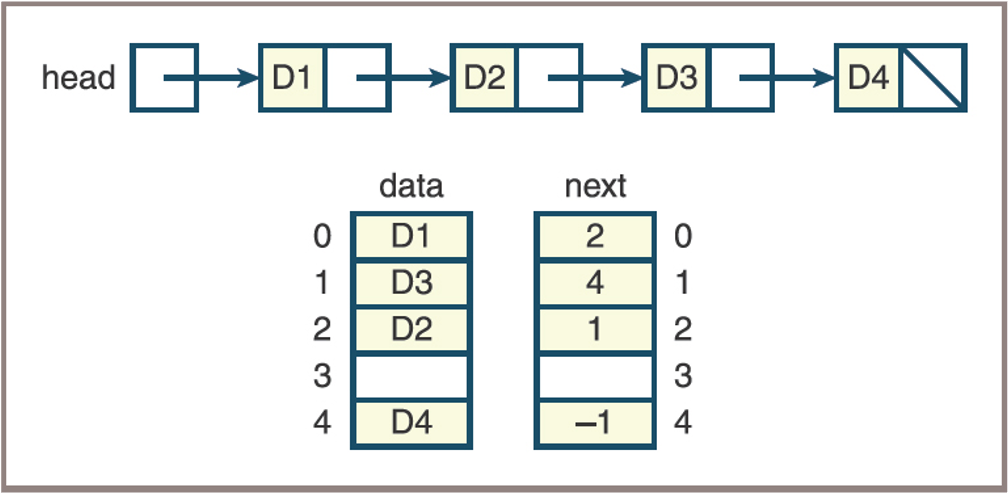
  • This figure shows a linked structure and its array representation

Memory Address

  • In more modern languages the programmer has direct access to the addresses of data in the form of pointers:
    • A node in a singly linked structure contains a data item and a pointer value
  • Python programmers set up nodes and linked structures by using references to objects:
    • Programmers define a singly linked node by defining an object that contains two fields: a reference to a data item and a reference to another node

Singly Linked Node Class

# Code for a singly linked node class:
class Node(object):
    """Represents a singly linked node."""
    def __init__(self, data, next = None):
        """Instantiates a Node with a default next of None."""
        self.data = data
        self.next = next
  • Node variables are initialized to either the None value or a new Node object
  • Code segment that shows some variations on these two options:
# Using the Singly Linked Node Class 
node1 = None                # Just an empty link    
node2 = Node("A", None)     # A node containing data and an empty link
node3 = Node("B", node2)    # A node containing data and a link to node2

Using the Singly Linked Node Class

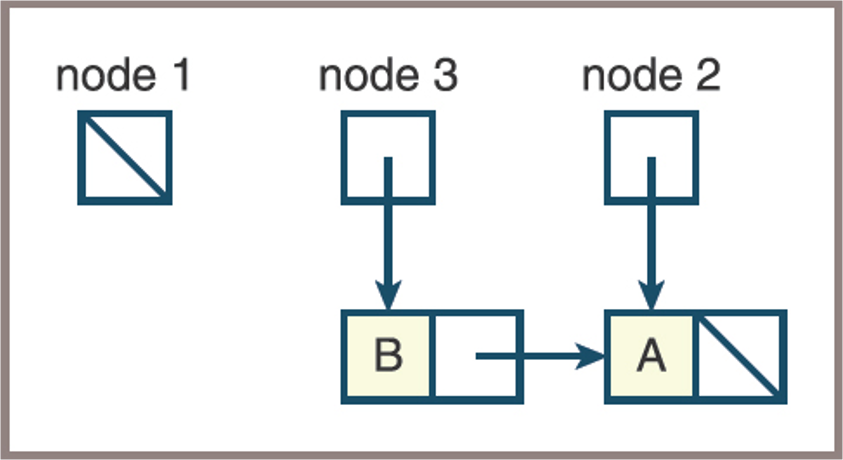
  • Figure below show the state of the three variables after the code in previous slide is run
    • Three external links

Using the Singly Linked Node Class

  • Suppose you attempt to place the first node at the beginning of the linked structure that already contains node2 and node3 by running the following statement: node1.next = node3
  • Python responds by raising an AttributeError
  • To create the desired link, you could run either
node1 = Node("C", node3) 

or

node1 = Node("C", None)
node1.next = node3

Using the Singly Linked Node Class

  • Linked structures are processed with loops: Use loops to create a linked structure and visit each node in it
  • Code to create a singly linked structure and print its contents:
"""
File: testnode.py
Tests the Node class.
"""
from node import Node
head = None
# Add five nodes to the beginning of the linked structure
for count in range(1, 6):
    head = Node(count, head)
# Print the contents of the structure
while head != None:
    print(head.data)
    head = head.next

Knowledge Check!

  1. Using box and pointer notation, draw a picture of the nodes created by the first loop in the tester program.
  2. What happens when a programmer attempts to access a node’s data fields when the node variable refers to None? How do you guard against it?
  3. Write a code segment that transfers items from a full array to a singly linked structure. The operation should preserve the ordering of the items.

Operations on Singly Linked Structures

  • The programmer must emulate index-based operations on a linked structure by manipulating links within the structure
  • This section covers how these manipulations are performed in common operations, such as
    • Traversals
    • Insertions
    • Removals

Traversals Linked Structures

  • Traversal
    • Uses a temporary pointer variable named probe
    • This variable is initialized to the linked structure’s head pointer and then controls a loop as follows:
    probe = head
    while probe != None:
      <use or modify probe.data>
    probe = probe.next

Traversal Linked Structures

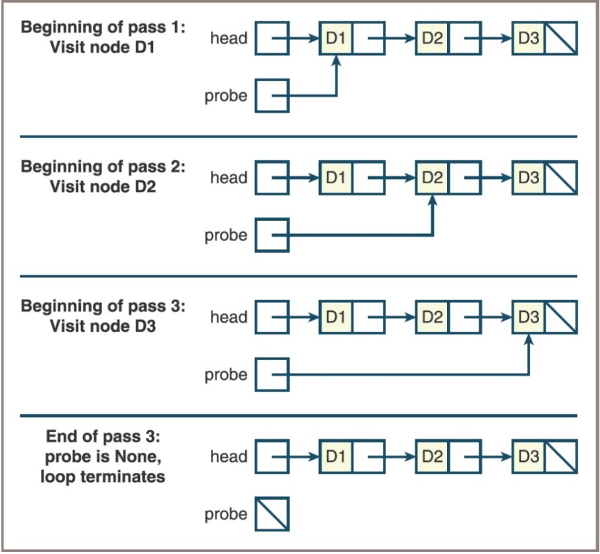
  • Figure shows the state of the pointer variables probe and head during each pass of the loop
    • Traversing a linked structure

Searching Linked Structures

  • The sequential search of a linked structure resembles a traversal:
    • You must start at the first node and follow the links until you reach a sentinel
  • Two possible sentinels
    • The empty link, indicating there are no more data items to examine
    • A data item that equals the target item, indicating a successful search

Searching Linked Structures

  • The form of the search for a given item:
probe = head
while probe != None and targetItem != probe.data:
    probe = probe.next
if probe != None:
    <targetItem has been found>
else:
    <targetItem is not in the linked structure>
  • Accessing the ith item of a linked structure is also a sequential search operation
  • Here is the form for accessing the ith item:
# Assumes 0 <= index < n
probe = head
while index > 0:
    probe = probe.next
    index -= 1
return probe.data

Replacement Operations of Linked Structures

  • Replacement operations also employ the traversal pattern:
    • Search for a given item or position in the linked structure and replace the item with a new item
  • The form of the operation:
# Assumes 0 <= index < n
probe = head
while probe != None and targetItem != probe.data:
    probe = probe.next
if probe != None:
    probe.data = newItem
    return True
else:
    return False

Replacement Operations of Linked Structures

  • The operation to replace the ith item assumes that 0 <= i < n
  • Here is the form:
# Assumes 0 <= index < n
probe = head
while index > 0:
    probe = probe.next
    index -= 1
probe.data = newItem

Inserting at the Beginning

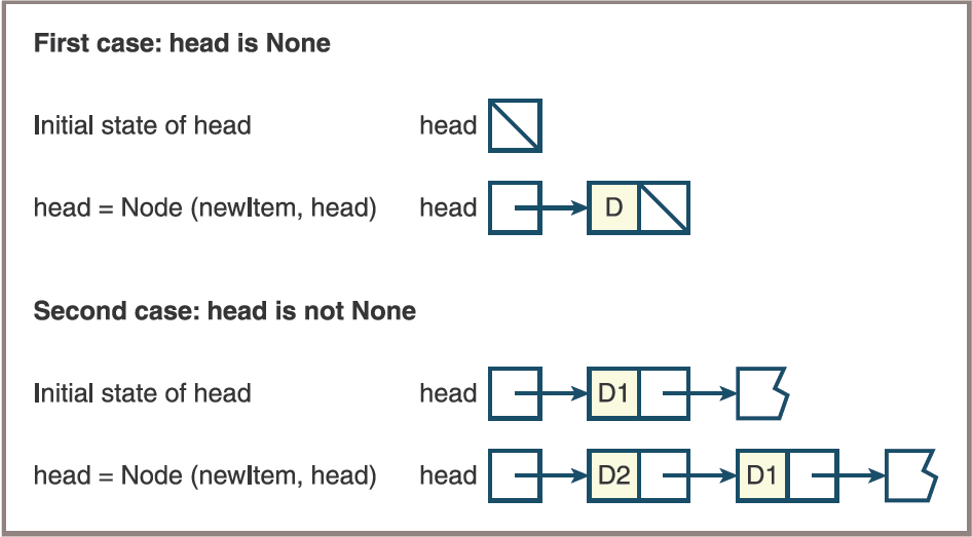
  • The form: head = Node(newItem, head)
  • Figure below traces this operation for two cases:
    • The pointer is None in the first case, so the item is inserted into the structure
    • In the second case, the second item is inserted at the beginning of the same structure
Inserting at the End

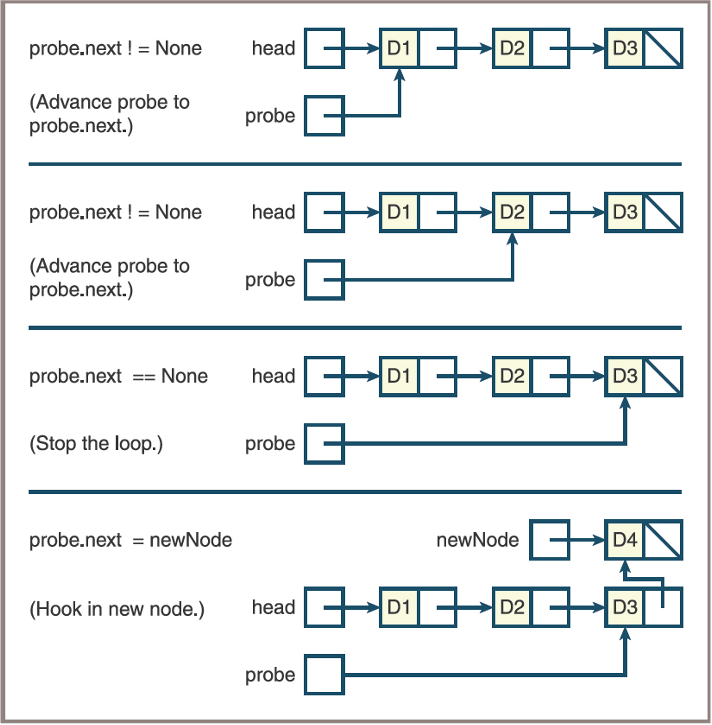
  • Inserting an item at the end of a singly linked structure must consider two cases:
    • The head pointer is None, so the head pointer is set to the new node
    • The head pointer is not None, so the code searches for the last node and aims its next pointer at the new node
  • The second case returns you to the traversal pattern. Here is the form:
newNode = Node(newItem)
if head is None:
    head = newNode
else:
    probe = head
while probe.next != None:
    probe = probe.next
probe.next = newNode

Inserting at the End

  • Inserting an item at the end of a linked structure
Removing at the Beginning
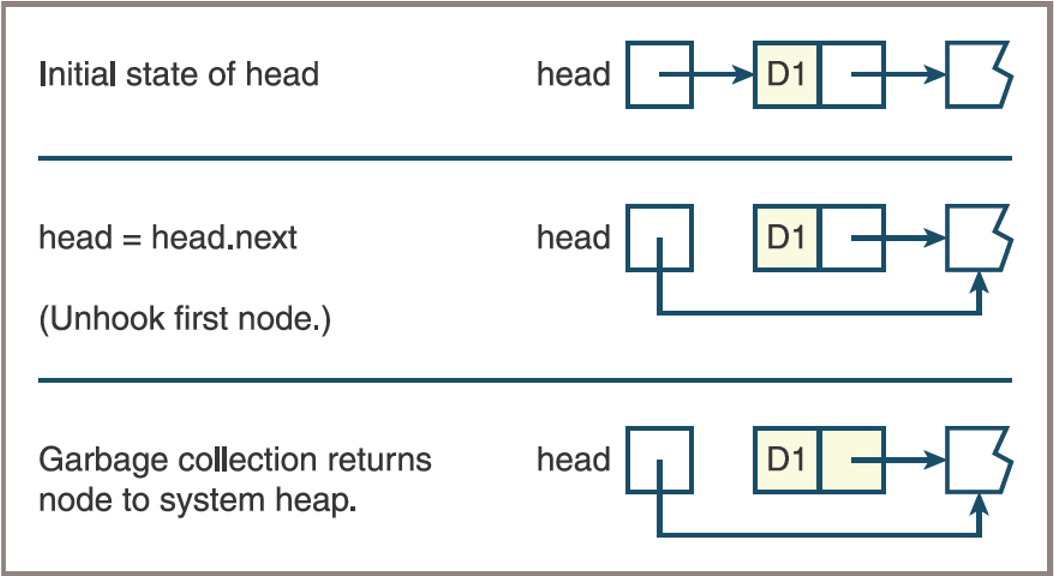
  • To remove an item at the beginning of a linked structure, here is the form:
# Assumes at least one node in the structure
removedItem = head.data
head = head.next
return removedItem

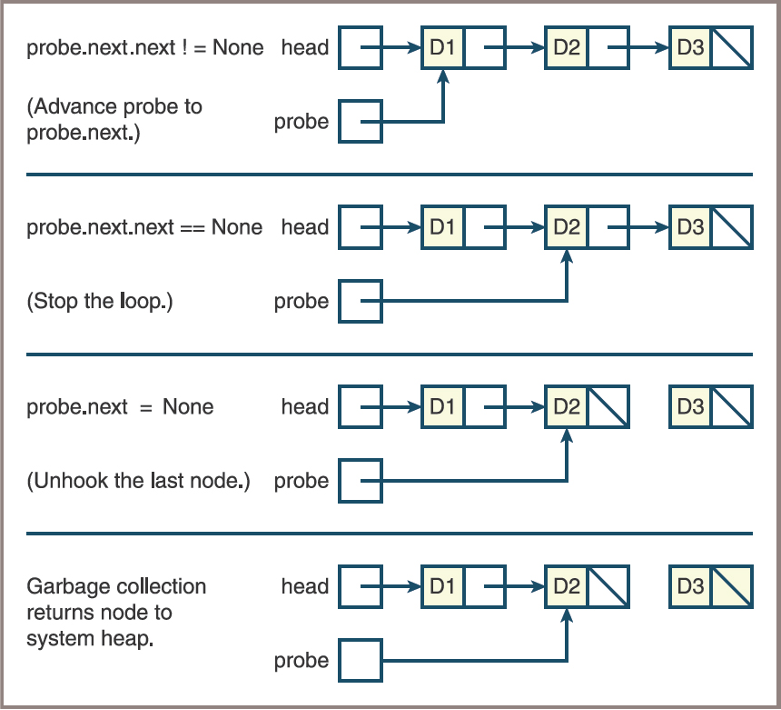
Removing at the End

  • Removing an item at the end of a singly linked structure assumes at least one node in the structure
  • Two cases to consider
    • There is just one node and the head pointer is set to None
    • There is a node before the last node and the code searches for this second-to-last node and sets its next pointer to None
  • In either case, the code returns the data item contained in the deleted node

Removing at the End

# Assumes at least one node in structure
removedItem = head.data
if head.next is None:
    head = None
else:
    probe = head
    while probe.next.next != None: # notice this access the last node link from the predecesor.
        probe = probe.next
    removedItem = probe.next.data
    probe.next = None
return removedItem

Removing at the End

  • Inserting an item at the end of a linked structure
Inserting and Removing items at any Position

Next class!