Two-Dimensional Array
Fred Agbo
2025-09-17
Announcements
- Welcome back!
- We briefly revisit Arrays: 2D
Introducing Two-Dimensional Arrays
- So far, we’ve worked with one-dimensional arrays (lists or NumPy arrays).
- But real-world data often comes in tables, grids, or matrices.
- A two-dimensional array (2D array) is like a spreadsheet: rows and columns.
- In Python, you can represent a 2D array as a “list of lists” or, more efficiently, as a NumPy array with two dimensions.
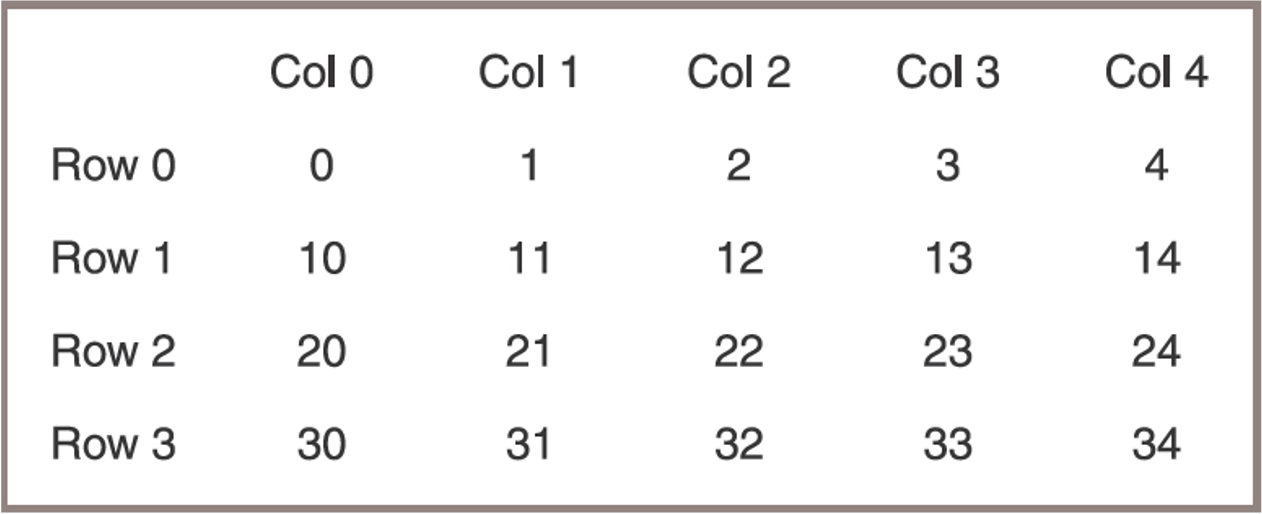
Example of 2D Array
- A two-dimensional array or grid with four rows and five columns
Defining a 2D Array Class
- A 2D array also called
Gridhere must recognize two methods that return the number of rows and the number of columns: - For purposes of discussion, these methods are named
getHeightandgetWidthTechniques for manipulating one-dimensional arrays are easily extended to grids - Code for the Grid class is shown in the next slide
Code Example: Grid Class
from arrays import Array

class Grid(object):
    """Represents a two-dimensional array."""

    def __init__(self, rows, columns, fillValue = None):
        self.data = Array(rows) # recall that we previously defined the Array class which is imported
        for row in range (rows):
            self.data[row] = Array(columns, fillValue)

    def getHeight(self):
        """Returns the number of rows."""
        return len(self.data)

    def getWidth(self):
        "Returns the number of columns."""
        return len(self.data[0])

    def __getitem__(self, index):
        """Supports two-dimensional indexing
        with [row][column]."""
        return self.data[index]

    def __str__(self):
        """Returns a string representation of the grid."""
        result = ""
        for row in range (self.getHeight()):
            for col in range (self.getWidth()):
                result += str(self.data[row][col]) + " "
            result += "\n"
        return result
Creating and Initializing a Grid
-The following code segment traverses the grid to reset its cells to the values shown in next slide:
Creating and Initializing a Grid
- To create a Grid object,
- Run the
Gridconstructor with three arguments: height = 4, width = 5, and an initial fill value = 0:
- Run the
from grid import Grid
grid = Grid(4, 5, 0)
print(grid)

# >>> Output
0 0 0 0 0
0 0 0 0 0
0 0 0 0 0
0 0 0 0 0- This was easier to acheive with Numpy as you did last week!
- Worth seeing how traditonal array class implements 2D arrays