INTERFACES & INHERITANCE
Fred Agbo
2026-02-18
Announcements
- Welcome back!
- Week 6 assignment (Problem set 3) is due today
- Mini project 1 grade is published.
- My main concern is the slight deviation from the requirements in your solutions.
- It will be good to follow the instructions and solve assignments accordingly.
- PS2 grading is being graded and will be published ASAP.
Learning Objectives - Recall
- Implement multiple classes that conform to the interface of a collection type
- Assess the tradeoffs in running time and memory usage of multiple implementations of a given collection type
Link-Based Implementation of Bag
- To develop a link-based implementation of a bag collection, focus on two things:
- You’re using the same interface as before, with all the methods specified in the file
baginterface.py - You need to shift your way of thinking from arrays to linked structures to represent the bag’s data
- You’re using the same interface as before, with all the methods specified in the file
- If a method does not access the array variable, it does not have to access the linked structure variable either
- Therefore, you can copy several completed methods from the
ArrayBagclass, without changes to theLinkedBagclass
Link-Based Implementation of Bag
- The only methods that will have different implementations in the
LinkedBagclass are those that cannot avoid this direct access to data: __init____iter__clearaddremove
LinkedBag: Initialize the Data Structures
- The role of the
__init__method inLinkedBagis to create the instance variables and give them initial values - In this case, instead of an array and a logical size, the two pieces of data are a linked structure and a logical size
- To maintain consistency, you can use the same variable names as before:
- However,
self.itemsis now an external pointer instead of an array - This pointer is initially set to
None, the state of an empty linked structure - When the structure is not empty, s
elf.itemsrefers to the first node in the linked structure
- However,
LinkedBag: Initialize the Data Structures
"""
File: linkedbag.py
"""
from node import Node

class LinkedBag(object):
"""A link-based bag implementation."""

    # Constructor
    def __init__(self, sourceCollection = None):
        """Sets the initial state of self, which includes the
        contents of sourceCollection, if it’s present."""
        self.items = None
        self.size = 0
        if sourceCollection:
            for item in sourceCollection:
                self.add(item)
LinkedBag: Complete the Iterator
- The
__iter__method forLinkedBagsupports the same kind of traversal as it does inArrayBag:- The logical structure of the two methods is quite similar
LinkedBag: Complete the Methods clear and add
- The method
clearinLinkedBagis quite similar to its sister method inArrayBag - The method
addinLinkedBagleverages constant-time access by placing the new item at the head of the linked structure
LinkedBag: Complete the remove Method
- The method
removeinLinkedBagmust first handle the precondition and then do a sequential search for the target item - When the node containing the target item is found, there are two cases to consider:
- The target node is at the head of the linked structure, in which case, you must reset variable s
elf.itemsto this node’s next link - The target node is some node after the first one; in which case, the next link of the node before it must be reset to the next link of the target node
- The target node is at the head of the linked structure, in which case, you must reset variable s
LinkedBag: Complete the remove Method
def remove(self, item):
    """Precondition: item is in self.
    Raises: KeyError if item is not in self.
    Postcondition: item is removed from self."""
    # Check precondition and raise an exception if necessary
    if not item in self:
        raise KeyError(str(item) + " not in bag")
    # Search for the node containing the target item
    # probe will point to the target node, and trailer
    # will point to the node before it, if it exists
    probe = self.items
    trailer = None
    for targetItem in self:
        if targetItem == item:
            break
        trailer = probe
        probe = probe.next
    # Unhook the node to be deleted, either the first one or
    # one thereafter
    if probe == self.items:
        self.items = self.items.next
    else:
        trailer.next = probe.next
    # Decrement logical size
    self.size -= 1
ArrayBag and LinkedBag Performance
- The running times of the operations on the two implementations of bags are quite similar:
- The
inandremoveoperations take linear time in both implementations, because they incorporate a sequential search - The
removeoperation inArrayBagmust do the additional work of shifting data items in the array, but the cumulative effect is not worse than linear - The
+,str, anditeroperations are linear
- The
- The running time of the
==operation has several cases and is left as an exercise - The remaining operations are constant time:
- Although
ArrayBag’saddincurs an occasional linear time hit to resize the array
ArrayBag and LinkedBag Performance
- The two implementations have the expected memory tradeoffs
- When the array within an
ArrayBagis better than half full,- It uses less memory than a
LinkedBagof the same logical size
- It uses less memory than a
- In the worst case,
- A
LinkedBaguses twice as much memory as anArrayBagwhose array is full
- A
- Because of these memory tradeoffs, removals from an
ArrayBagare generally slower than they are on aLinkedBag
Testing the Two Bag Implementations
- The approach used to test these implementations is to include a tester function for each resource that you develop
- This function both
- Ensures that a new collection class conforms to a collection interface
- Checks to see that these operations do what they are supposed to do
Testing the Two Bag Implementations
- Code for a standalone application that you can run with any bag class
- The main function expects a type as an argument and runs the tests on objects of that type
Testing the Two Bag Implementations
"""
File: testbag.py
A tester program for bag implementations.
"""

from arraybag import ArrayBag
from linkedbag import LinkedBag

def test(bagType):
    """Expects a bag type as an argument and runs some tests
    on objects of that type."""
    print("Testing", bagType)
    lyst = [2013, 61, 1973]
    print("The list of items added is:", lyst)
    b1 = bagType(lyst)
    print("Length, expect 3:", len(b1))
    print("Expect the bag’s string:", b1)
    print("2013 in bag, expect True:", 2013 in b1)
    print("2012 in bag, expect False:", 2012 in b1)
    print("Expect the items on separate lines:")
    for item in b1:
        print(item)
    b1.clear()
    print("Clearing the bag, expect {}:", b1)
    b1.add(25)
    b1.remove(25)
    print("Adding and then removing 25, expect {}:", b1)
    b1 = bagType(lyst)
    b2 = bagType(b1)
    print("Cloning the bag, expect True for ==:", b1 == b2)
    print("Expect False for is:", b1 is b2)
    print("+ the two bags, expect two of each item:", b1 + b2)
    for item in lyst:
        b1.remove(item)
    print("Remove all items, expect {}:", b1)
    print("Removing nonexistent item, expect crash with KeyError:")
    b2.remove(99)
OOP Concept: Inheritance
Why Inheritance?
- This week, we will introduce …
- Use inheritance to share code among a set of classes
- Customize the behavior of a class by creating a subclass
- Future class, we will continue to discuss …
- How to factor the redundant data and methods of a set of classes into an abstract class
- Override the behavior of an inherited method by redefining it
- Decide where to place data and methods in a class hierarchy
Using Inheritance to Customize an Existing Class
- Easiest way to take advantage of inheritance
- Use it to customize an existing class
- Example: sorted bag class
ArraySortedBag(Project 3 of Chapter 5)- The sorted bag behaves just like a regular bag,
ArrayBag, but with exceptions: - The sorted bag allows the client to visit its elements in sorted order via the for loop
- The sorted bag’s
inoperator runs in logarithmic time - The items added to the bag must be comparable with each other
- The sorted bag behaves just like a regular bag,
Inheritance: Subclassing an Existing Class
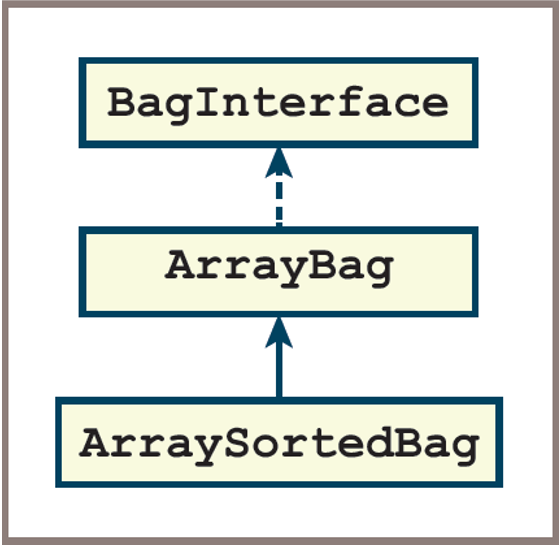
- This section covers inheritance by making the
ArraySortedBagclass a subclass of theArrayBagclass:ArrayBagis called the parent or superclass ofArraySortedBag
- Note
- Because the
ArrayBagclass implementsBagInterface, theArraySortedBagclass also implements thisinterfacevia inheritance
- Because the
Inheritance: Subclassing an Existing Class
This diagram depicts a subclass and
inheritancein a class diagram
Inheritance: Subclassing an Existing Class
- To create a subclass of an existing class consists the following steps:
- Make a copy of the parent’s class file
- Begin by deleting all the methods that do not have to change:
- You still need the
_init_method in the new class - To guarantee that the inheritance happens, you must place the name of the parent class within the parentheses of the class header
- Modify the code for the methods that must change
- Add any new methods
Inheritance: Subclassing an Existing Class
- There is one case where inheritance is not automatic
- From the figure above, the
_init_method inArraySortedBagmust call the_init_method in the parent classArrayBag- So that it can initialize the data contained there
- The syntax to call this method in the parent class is
ArrayBag._init_(self, sourceCollection)
- From the figure above, the
- The parent class name enables Python to select which version of the
_init_method to run - Note the additional argument, self, at the beginning of the argument list
- The optional source collection is also passed as an argument to the parent class’s
_init_method
ArrayBag and ArraySortedBag Example
- Code for the changes to ArraySortedBag so far:
from arraybag import ArrayBag

class ArraySortedBag(ArrayBag):
    """An array-based sorted bag implementation."""

    # Constructor
    def __init__(self, sourceCollection = None):
        """Sets the initial state of self, which includes the
        contents of sourceCollection, if it’s present."""
        ArrayBag.__init__(self, sourceCollection)
ArrayBag and ArraySortedBag (New Methods)
- Adding a New
_contains_Method- There is no
_contains_method inArrayBag: Python automatically generates a sequential search operation, using theArrayBagiterator, when theinoperator is used on a bag - To override this behavior, include a
_contains_method inArraySortedBag:- When Python sees the
inoperator used on a sorted bag, it also sees that bag’s_contains_method and calls it
- When Python sees the
- This method implements a binary search on the sorted bag’s array of items:
- This array, named
self.itemsis accessible in any of its subclasses
- This array, named
- There is no
ArraySortedBag- _contains_ Method
# Accessor methods
def __contains__(self, item):
    """Returns True if item is in self, or False otherwise."""
    left = 0
    right = len(self) - 1
    while left <= right:
        midPoint = (left + right) // 2
        if self.items[midPoint] == item:
            return True
        elif self.items[midPoint] > item:
            right = midPoint - 1
        else:
            left = midPoint + 1
    return False
ArraySortedBag - add Method
- The
addmethod inArraySortedBagmust place a new item in the appropriate position in a sorted array - In most cases you have to search for this position
- Two cases in which this search is unnecessary:
- When the bag is empty
- When the new item is greater than or equal to the last item
- In those cases you can add the new item by passing it along to the add method in the
ArrayBagclass - If not, you must look in the array for the first item that’s greater than or equal to the new item:
- Then open a hole, insert the new item, and increment the size of the bag
- Two cases in which this search is unnecessary:
ArraySortedBag - add Method
# Mutator methods
def add(self, item):
    """Adds item to self."""
    # Empty or last item, call ArrayBag.add
    if self.isEmpty() or item >= self.items[len(self) - 1]:
        ArrayBag.add(self, item)
    else:
        # Resize the array if it is full here
        # Search for first item >= new item
        targetIndex = 0
        while item > self.items[targetIndex]:
            targetIndex += 1
        # Open a hole for new item
        for i in range(len(self), targetIndex, -1):
            self.items[i] = self.items[i - 1]
        # Insert item and update size
        self.items[targetIndex] = item
        self.size += 1
ArraySortedBag - add Method
- Note the different prefixes used in the method call to
ArrayBag.addand in the variable reference toself.items:- The first is a class name, and the second is a reference to an instance of a class.
- Because
ArraySortedBagdoes not introduce a new version of the instance variableitems, the reference toself.itemshere locates the variable directly in theArrayBagclass.
ArraySortedBag - _add_ Method
- The
__add__method, which Python runs when it sees the+operator used with two bags, has practically the same code in theArrayBagclass and theLinkedBagclass: - The only difference is the class
nameused to create a new instance for the result bag - You simply repeat this pattern for
__add__inArraySortedBag, as follows:
Run-Time Performance of ArraySortedBag
- The
inoperator has a worst-case running time ofO(logn):- This is a big improvement on the linear running time of the in operator for regular bags
- The improved search time also has an impact on the methods that use the new
inoperator,- Even though these methods are still defined in
ArrayBag
- Even though these methods are still defined in
- Although the improved search still leaves
removewith a linear running time on average,- Less time is spent on the test of the precondition
Exercise
- Use the explanation with codes in the slide to implement
ArraySortedBagwhich inherits theArrayBagclass. - Write a simple tester function to test the behaviors of
ArraySortedBag.
Next week Reading:
- FDS - Lambert
- Chapter 7
- DS&A - John et al.
- Chapter 4