Lists Mutability
Fred Agbo
October 16, 2026
Happy Wednesday
- Class grouping today: Scan the QR code or go to https://tools.jedrembold.prof/daily
- Class code is
NyVK12 - Introduce yourselves! When last did you change your address?

Quick Announcements
- Session leaders reported your Wordle scores and attendance record
- Largely average performance
- A few people have had the 3 max absenses from session already
- For such people, each additional mising will take 5% from your total grade
- Project Breakout is due next week Monday
- I highly recommend you to attend the session meeting to receive practical help on the Breakout project.
Mutants
- The most important difference between strings and lists is one of
mutability
- Strings we have already identified as being immutable: you can not change the individual elements
- Lists, in contrast, are mutable, which means that we can change or assign new values to the elements of a list
- Immutable objects have many advantages in programming:
- You don’t have to worry about if the values will change
- Immutable values can be more easily shared
- Immutable objects are easier to use with concurrent programs
- In some situations though, mutable objects are the perfect tool for the job
A Tutorial on Lists
- Thinking about mutable objects requires a shift in how we visualize our code interacting with the objects in memory
- Link here
cool = ['blue', 'violet']
warm = ['red', 'orange']

colors = [cool, warm]
other_colors = [['blue', 'violet'],
                ['red', 'orange']]

print(colors == other_colors)
print(colors is other_colors)

cool[0] = 'indigo'
warm = ['orange', 'yellow']

print(colors)
print(other_colors)
For Reference
- When working with mutable objects, it is better to think of the variable as holding a reference to the object, rather than the actual contents of the object
- I find it useful to think of a reference as the “address” in memory where that object’s contents can be found
- This undeniably complicates things, as referencing a mutable object lets you change it, which will immediately be reflected in anything else that referenced that object
- Mutable objects can be terrific to work with, as their mutability makes them very flexible, but be wary of unexpected behavior
Lists as Arguments
- When you pass a list as an argument to a function or return a list as a result, only the reference to the list is actually passed back and forth
- This means that the elements of the list are effectively shared
between the function and the caller
- Changes that the function makes to the elements will persist after the function returns
- Example of reversing a list in PythonTutor: here
Sneaky Mutability
- List’s mutability can frequently be very nice to work with, but as with lists as arguments to functions, you need to be careful in some instances to ensure you understand how Python is treating the list
- One could encountered a few other problems where it can be easy to mess up:
Cloning
- What can we do in these sorts of instances to not let mutability trip us up?
- Clone the list instead of just assigning a reference
- Creates a new object in memory
- Several ways you can make a shallow clone (in code)
- Using the
.copy()list method - Any slice always returns a new object
- Using the
list()function will return a new object
- Using the
Group Problems LO’s
- Correctly trace code working with lists where mutability matters
- Work with and think about the id of mutable objects
- Practice interacting with the VSCode debugger
Problem 1: Tracing Clues
What would the below code print out at the end?
ballroom = ['Miss Scarlet', 'Mr. Green', 'Prof Plum']
hall = ['Mrs. Peacock', 'Col. Mustard']
study = ['Mrs. White']
house = [ballroom, hall, study]
hall = hall + study
for character in ballroom:
    if character[0] == 'P':
        house[1][0] = character
print(hall)Problem 2: The Escape
- Work in pairs on a single computer
- At the top of the lecture content
maze.pyfile, enter in your pair/trios names - The idea here is that you are plunged into a mysterious maze
- To cast the escape spell, you need to collect three items: a spellbook, potion, and wand
- The trick lies in finding them
Problem 2: The Maze
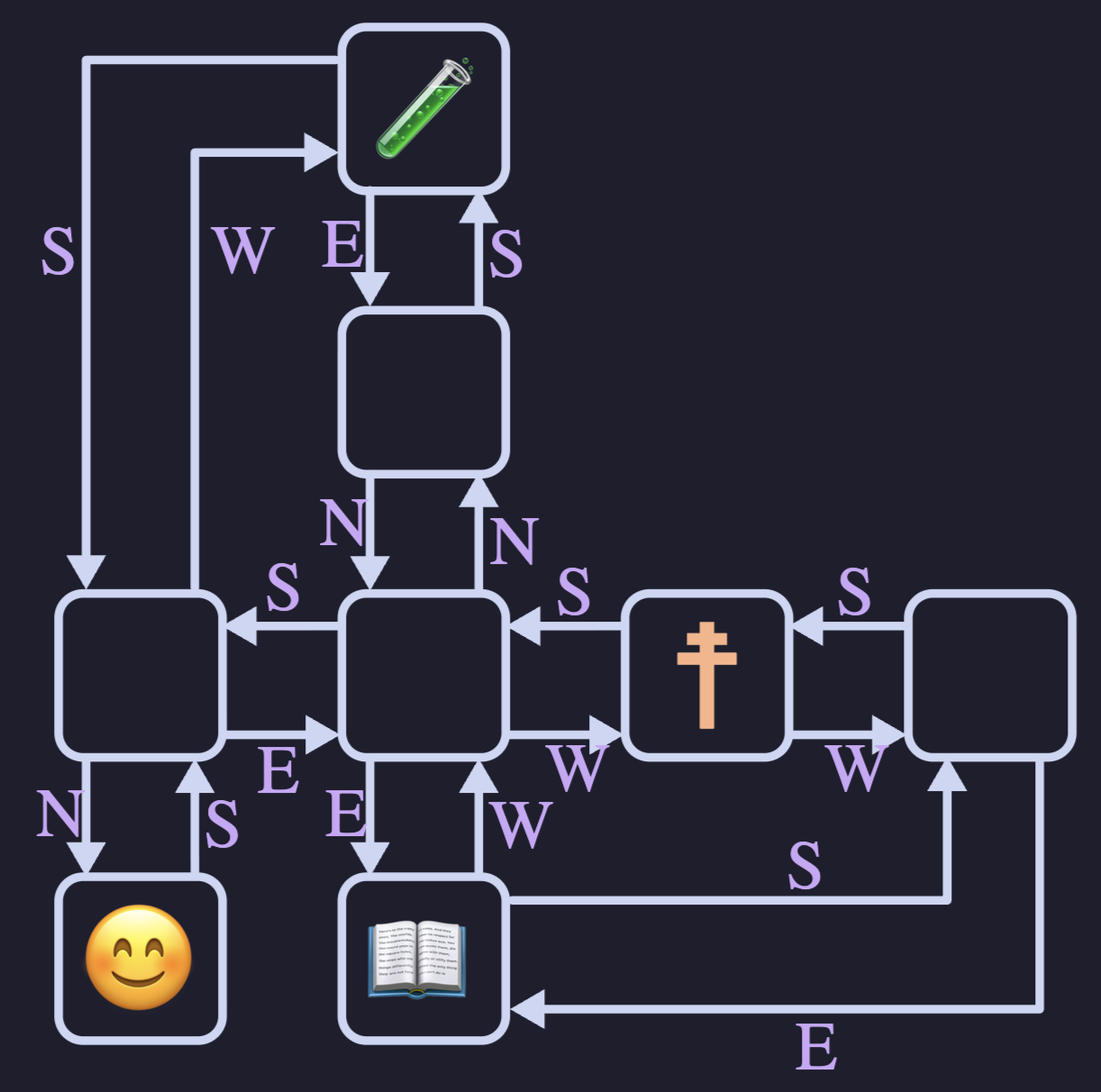
- Each maze is generated custom for your group
- Consists of connected rooms, depicted with a special
MazeCellobject - Each room has:
- Some contents. Usually
None, but sometimes one of the items you need! - A series of directions that reference other connected rooms
(or
None)
- Some contents. Usually
Problem 2: The Exploration
- To have a chance of finding your way out, it would help to work out the layout of your maze
- Can do so by utilizing VSCode’s debugger!
- Place a breakpoint on the indicated line, and run the program in debug mode
- Now you can “explore” the
MazeCells by using the dropdown menu that appears - Construct yourself a map!
- What room connects to what? The memory address is unique here!
- What item, if any, is in the room?
Problem 3: Escaping!
- Given your map, construct a set of instructions that would take you from your starting position to gather all three needed items
- Express this series of instructions as a string of “NSEW” characters
- Enter it into
twistyfunction when it is called at the bottom of the program, and then run the program normally. Did you escape?!