Enigma Project
Fred Agbo
November 11, 2026
Quick Announcements
- I will be working on grading the midterm 2 and publishing it early
next week
- Project Enigma guide went out yesterday
and due on Monday November 23
- You essentially have more than a week for this one.
Use the time wisely!
- We will introduce the project in the class today …
- Prof Jed Rembold will teach on Friday and Monday next week.
- Hopefully, Jed will demonstrate with you how to visualize Enigma
problem
- Section meeting this week will also be dealing with things related
to the Enigma problem
Visual Simulation (Jed’s class)
- How are the parts of an Enigma machine connected?
- How do the rotors work, and how does changing a rotor change the
wiring connections?
- How can we encrypt and decrypt messages with an Enigma Machine?
Walkthrough the Milestones (Fred)
Project 4 Milestones
- Project 4 has slightly more milestones than past projects, but each
is still meant to give you a testable aspect of the program that you can
bite off one piece at a time
- Milestone 0: Activate the keyboard when pressed
- Milestone 1: Connect the keys directly to the lamps (no
encryption)
- Milestone 2: Design and implement rotors
- Milestone 3: Implement one stage in the encryption (through 1
rotor)
- Milestone 4: Implement the full encryption path
- Milestone 5: Make the rotors advance properly each key press
- Web examples exist for helping you test each step of the process,
linked here
and in the guide.
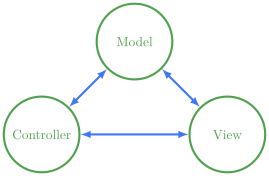
Model-Controller-View
- The Enigma project is designed using the common model,
controller, view paradigm
- Breaks an interactive program up into 3 pieces:
- The controller: the piece that deals with user input
- The view: the piece that handles graphical output
- The model: the piece that controls what should be happening at any
given time
Modeling
- In the Enigma project, the view and the controller are handled for
you
- Both are actually handled in the same module
- Both export various methods that you can use to get input or
interact with them from within the model
- You are responsible for writing the code that comprises the
model
- There is also a constants module, where all of the various constants
that you may need are stored
// reveal.js plugins