Kickoff with Karel the Robot
Fred Agbo
August 24, 2026
Announcements
- Welcome to CS151: Intro to Programming with Python!
- Things to do:
- Bring phone or computer to the class for polling questions in the future
- Watch the vidoes prepared by Professor
Jed under Course Guide on Canvas and
follow the instructions to:
- setup your computer with tools needed in this
class.
- learn how to use Classroom
50 (formerlly GitHub Classroom) for the
homework in this class
- As time permits, I’ll show how this tool works, similar to Github Classroom.
- setup your computer with tools needed in this
class.
- Problem Set 0 - NOT GRADED is posted on cavase just to test whether your installation works properly
My Vitals
- Name
- Professor/Dr Fred Agbo
- Office
- Ford 209
- Office Hours
- T, TH 10:30-12:00pm
- Online or anytime I’m around
- Email:
- fjagbo at willamette.edu
- Office Phone:
- 503-370-6862

Icebreaker
- What’s the most interesting thing you’ve ever used a computer for?
- What’s the first word that comes to mind when you think about programming?
- Take a moment to pause and think
- Envision yourself at the end of this semester, a
capable, if perhaps slow, programmer
- What is one tool or program that you might create that would be useful to you or someone else?
- Take a few minutes to think, and then introduce yourself to your neighbor and share with them your ideas
- Envision yourself at the end of this semester, a
capable, if perhaps slow, programmer
Motivations
- Fifty years ago: Mainframes filled rooms and had tiny processing power.
- Today: Pocket-sized phones run complex AI models and connect to global data instantly.
- The shift: Hardware is smaller, software is smarter, and access is global.
- The Speed of Growth
- New tools emerge every week.
- AI and automation push limits past old boundaries.
- Change happens faster now than at any point in history.
- Why Study It Now?
- You build the tools that run the world.
- You help solve hard problems in medicine, art, and science.
- You guide how humans use powerful new technology.
How to Succeed
- People enter this course with a variety of initial experiences
- This course is built for an individual entering with zero coding experience
- Path to Success
- There is a significant time committment for this course
- The only way to get good at coding is to do coding
- Coding can often times involve a lot of frustrating troubleshooting or failed attempts
- Expect, on average, the full use of WU’s 2-3 hours outside class for every hour in class
- If you are stuck for more than 30 minutes, ask for help
from your section leaders, colleagues, QUAD, or myself
- While it is important to give yourself time to troubleshoot, when you are learning, being stuck for long leads to frustration
- There is a significant time committment for this course
My Goals
To gain the skills, knowledge, and confidence necessary to write, test, and debug Python programs requiring several hundred lines of code.
Doing so will require that students be able to:
- implement simple algorithms using Python control structures,
- apply decomposition and step-wise refinement techniques,
- design data structures to model information,
- execute all phases of the programming process, including design, implementation, testing and debugging
Your Goals?
- Fill out this short survey on your goals using this link
- Keep this link for subsequent class polls
Grading
- Standard grading:
- 90/80/70 etc grade cut-offs
| Assignment & Participation (incl. class & section attendance) | 10% |
| 5 Problem Sets | 20% |
| 5 Defined-Projects | 30% |
| 2 Midterms | 20% |
| A Final Exam | 20% |
Class Components
Reading Assignments & Participation
Scored through participation watching the video and reading the chapters before class, in-class polls, in-class collaborations, or contacting me with a question about a specific slide.
Sometimes 1-2 polls per day
Answering any poll gets you full points for the day (even if you are wrong!)
Answering correctly gets you bits of extra credit
Polling website at this link. Remains constant throughout the semester.
Perusall
- 1-2 short content videos by Professor Jed will be
posted 2 days before each class
- Around 10 min each
- The expectation is that you have watched those videos and thought
about that content before arriving to class
- We’ll be going over the lecture briefly then jump to demonstrating the content, not introducing the content
- A Perusall assignment is due before class starts each day, so ensure you have watched and interacted with these content videos
- Get full points by watching them and asking questions or responding to questions or prompts myself or others have left
Homework
- Falls into two categories:
- Problem Sets: smaller, more focused assignments
- Graded on standard, numeric scales
- Projects: larger, more integrative assignments
- Graded on a more qualitative scale (next slides)
- Problem Sets: smaller, more focused assignments
- All will be due on Mondays at 10:00pm
- Submissions of both will be handled through
Classroom 50
- Learn how to use GitHub for this class from Jed’s videos which is the same as using Classroom 50.
- Follow along in todays class to learn how (if time permits)
- 3 cumulative late days (24 hours max) over the entire semester without penalty then penalties enacted for each subsequent day late (terms & conditions apply see the syllabus).
Project Sneak Peeks!
Project Scoring
| | 105 | A submission so good it “makes me weep” |
| | 100 | Exceeds requirements |
| | 95 | Satisfies all assignment requirements |
| | 90 | Meets most requirements, but some issues |
| | 80 | Some more serious problems evident |
| | 60 | Even worse… |
| | 30 | Why even bother turning this in? |
Sections
- Everyone will be placed into small sections of approx. 10-12 students, with one section leader
- All section leaders are students who recently took and excelled in this course
- Will meet as a group with your section leader once
a week for an hour to go over and work on problems/projects
- These meetings will be on Wednesdays or Thursdays and it is mandatory
- You can have 3 excused absences throughout the
semester. Contact section leader prior when you will be absent.
- beyond 3 absences (excused or not) will cause you 5% deduction from your cumulative grade
- Here
is the form where you can enter in ALL your
availability on these days.
- Fill out the form latest on Thursday night this week to get people placed into sections
- Section leaders will serve as your major support! Ask for help or guidance from them weekly
- Prof. Jed is in charge of the sections and he is planning to start section meetings next week
Tests
- Tests are necessary to assure retention of material and ensure that some are not getting too much help on the assignments.
- Just two midterm this semester and one final:
- Midterm 1 on Oct 2nd (in-class, more info to come)
- Midterm 2 on Nov 6th (in-class, more info to come)
- Final:
- 9:10 – 10:10 M/W/F -> Tuesday December 8th (8:am - 11am)
- See this calendar to confirm your exact date. (Finals are in-class, use of computer, partially open)
- This policy has actually been seen to improve student scores, as it prevents you from wasting tons of time obsessing about a small mistake!
- Practice questions and study materials will be given out in advance.
Communication
- I have had much better luck recently channeling class communication
(announcements, questions, answers, etc) through a class Discord server
and on Canvas
- Invite instructions are posted on the main Canvas landing page and on the second slides for this class
- Totally free to sign up and use Discord
- If you already use Discord, you can create another account to switch between, or you can use your existing account
- Both Canvas and Discord will be the main online location for announcements and questions and answers.
- Discord has support for code-blocks when talking about code by
surrounding code in triple backticks:
```this is formatted nicely as code```
Course Policy: Use of AI or Genenerative AI
- I recognize the transformative potential of Artificial Intelligence GenAI in intro programming course.
- As such, I encourage students to explore and utilize these technologies ONLY as supplementary learning tools
- AI can be an excellent resource for:
- Explaining complex concepts, Providing coding examples, debugging suggestions
- Recommending best practices, Exploring new ideas and approaches
- Do not use AI to directly solve assignments: Assignments are designed to develop your skills and understanding.
- Using AI to generate solutions for assignments is strictly prohibited.
- Acknowledge AI usage when you use it for inspiration or assistance
in your work, clearly acknowledge it.
- Include a brief note explaining how and where AI was used.
Course Policy: Academic Honesty
- Learning programming, in most cases is by copying, integrating,
& debugging codes.
- Use these strategies in a very helpful manner
- Be honest and transparent
- trust the instructor not to mark you down when you disclose your helper
- You must not copy someone entire solutions or program code and paste
as though it is your own. This is plagiarism!!!
- You must not share your solutions or code with other students.
- But you can explain to them on how to solve the problem.
- You are also encouraged to work alongside others enroute to finding a solution.
- You must indicate on all your submitted assignment who, what, or where you received any assistance.
Diving In
- This course is an introduction on computer science, and covers more than just programming!
- Python is used to teach the programming portion of the course, but the focus is less on Python itself and more on general computer science principles.
- If you come across situations where you need to know a bit more about specific Python details, there are plenty of resources online, or just ask me!

Effective Communication
- To communicate effectively with someone or
something, you really need two layers of communication:
- A shared language or method of conveying
information
- The English alphabet, for example
- In our case, Python
- A joint agreement about what constitutes
meaning
- Need ways to limit confusion or misunderstanding
- Following conventions
- Being able to explain things clearly and unambiguously
- Need ways to limit confusion or misunderstanding
- A shared language or method of conveying
information
Giving Clear Instructions
- We will initially make the language extremely simple so that we can focus on the second layer
- Karel the Robot exists in a very simple 2D world
- Has a very limited set of actions:
- Can move forward one space
- Can rotate counter-clockwise (turn left) 90 degrees
- Can pick up a beeper
- Can drop off a beeper
- We will be spending the first several class days just interested in
how we can take these simple instructions and get Karel to solve a wide
variety of problems
- This content is not in your book, but more in-depth descriptions can be found here
The Karel World
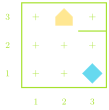
- Karel’s world is defined on a grid
- avenues run north-south
- streets run east-west
- The intersection between a street and avenue is called a corner
- Compass directions are as you’d have them on a map, with North pointing upwards
- Walls are impassable
- Beepers are diamonds
- Karel is a house-shaped polygon
Karel Commands
As we mentioned before, Karel is a simple robot, and can really only do 4 potential actions
Command Action move()Moves Karel forward one corner in whatever direction they are facing turn_left()Rotates Karel 90 deg counter-clockwise pick_beeper()Picks up a beeper on the ground put_beeper()Places a beeper on the ground Our commands are just sequences of these actions
Example
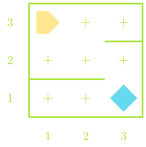
- Suppose we had the situation to the right and wanted to navigate to the beeper, pick it up, and then drop it at the corner of 1st avenue and 1st street.
- Take a moment to write out your instructions.
- Remember you can only move, rotate left, and pick up or drop the beeper
- Note that there are multiple ways to do this! Which is better?
One Solution
def main():
    move()
    turn_left()
    turn_left()
    turn_left()
    move()
    turn_left()
    move()
    turn_left()
    turn_left()
    turn_left()
    move()
    pick_beeper()
    turn_left()
    turn_left()
    turn_left()
    move()
    move()
    put_beeper()
GitHub/Classroom 50 Demonstration
- There will be instructions on how to run through this process on Jed’s video
- but I’ll (as time permits) demonstrate how you would usually use GitHub Classroom
- Grab the PS0 posted in week 1 on canvas to test if your installation stack is working